Towdak Display Font Review: Funky Typography for Your Next Craft Project
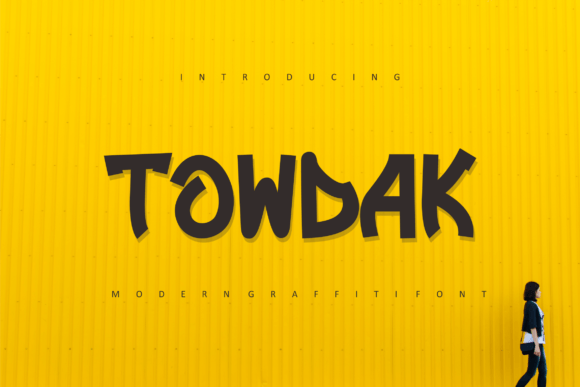
If you have ever spent an afternoon hunched over a candle label mockup, trying to make a product name feel as playful as the scent inside, you know the struggle of finding the right display font. I design handmade goods for my small shop, and when I first opened Towdak on my computer, I knew instantly this was the quirky typeface I had been missing. Towdak is a modern and quirky display font with uniquely shaped characters that lend themselves beautifully to funky, original designs. From boutique packaging to digital printables, this font has a personality that stands out without screaming for attention. Let me walk you through how Towdak performs on real products and shop materials, so you can decide if it deserves a spot in your creative toolbox.
Testing Towdak on Candle Labels and Product Packaging
The first project I tested Towdak on was a set of soy candle labels for my handmade line. I wanted the scent names to feel whimsical and bold, and Towdak delivered exactly that. The font's modern and quirky display style gave each label a hand-drawn charm that felt both polished and playful. I printed a few test labels at 1.5 inches wide, and the character shapes remained crisp and readable. The uneven baseline and playful letterforms made each scent name feel like a tiny piece of art. For product packaging like candle jars, bath salts, or small-batch skincare, Towdak adds a layer of handmade authenticity that standard fonts simply cannot replicate. Pair it with a simple kraft paper tag and a neutral ribbon, and your packaging will look like it belongs on a boutique shelf.
One thing I always check when testing a display font on physical products is how it handles shorter text. Towdak shines with single words, short phrases, and product names. I used it for candle names like "Moonlight" and "Honeycomb," and each one felt distinct and memorable. If you sell handmade candles, soaps, or packaged goods, Towdak is a strong candidate for your label designs. Just keep in mind that for very tiny text, such as ingredient lists or fine print, you will want to pair Towdak with a clean sans serif font for legibility.
How Towdak Brings Playful Energy to Greeting Cards and Invitations
Greeting cards are one of my best-selling printable products, and I am always on the lookout for display fonts that add character without overwhelming the design. Towdak is perfect for birthday cards, congratulations notes, and funny greeting cards where the wording itself is the star. I created a set of "Happy Birthday" cards using Towdak for the main headline, and the quirky letter shapes added a sense of joy and spontaneity. The font works especially well when you combine it with simple illustrations or abstract line art, because Towdak holds its own as a visual anchor.
For wedding invitations, I would recommend using Towdak sparingly. It is not a formal or elegant script font, but it can work beautifully for playful wedding elements like welcome signs, directional boards, or the couple's names on an informal invite. If you design invitation suites for casual weddings, bridal showers, or garden parties, Towdak can add a funky, modern twist. I tested it on a mockup for a backyard wedding welcome board, and the font's uneven rhythm gave the design a relaxed, handmade feel that guests will love.
When using Towdak for cards and invitations, remember that this is a display font meant for headlines and titles. Keep the main sentiment short and let the font do the work. Pair it with a simple serif or handwritten font for body text to maintain balance. The contrast between Towdak's quirky shapes and a clean secondary font creates visual interest and makes your design feel intentional.
Using Towdak for Boutique Tags, Stickers, and Shop Branding
As a small shop owner, I rely on consistent branding across my packaging, tags, and stickers. Towdak has become my go-to display font for boutique tags and product labels where I want to convey a sense of creativity and fun. I designed a set of hang tags for my handmade tote bags, using Towdak for the brand name and a simple sans serif for the care instructions. The result was a tag that felt both professional and approachable. Customer recognition improved because the font's unique character shapes made my brand name instantly recognizable, even on a crowded market table.
Stickers are another area where Towdak excels. Whether you are making vinyl die-cut stickers for laptops or paper stickers for planners, the bold and quirky letterforms hold up well at various sizes. I tested Towdak on a 2-inch round sticker featuring a single word, and the laser cutter handled the intricate shapes without any trouble. For Cricut and Silhouette users, Towdak is generally easy to cut as long as you keep the text size above 0.75 inches. The font's open letterforms and distinct shapes reduce the risk of weeding issues, which is a huge plus for anyone who has struggled with delicate script fonts.
If you sell digital printables like wall art, planner pages, or sticker sheets, Towdak is an excellent addition to your design assets. I created a printable wall art piece with a motivational quote using Towdak for the main phrase, and the finished product had a modern, gallery-worthy look. The font's quirky personality made the design feel original and fresh. For shop branding, consider using Towdak as part of your logo or watermark. It pairs well with a clean sans serif font for a balanced brand identity that feels both creative and trustworthy.
Readability and Cutting Machine Performance with Towdak on Physical Products
One of the most important factors when choosing a display font for physical products is readability at different sizes. Towdak performs admirably in this area. The letterforms are distinct and each character has its own personality, which means even at smaller sizes, the words remain legible. I tested Towdak on a 1-inch sticker with a four-letter word, and the details were still clear. For larger signage like welcome boards or wall art, the font's quirky shapes become even more striking. If you are designing a farmhouse sign or a seasonal decor piece, Towdak adds a handcrafted feel that complements rustic and modern interiors alike.
However, it is worth noting that Towdak is not ideal for long paragraphs or dense information. The font's playful character shapes can become tiring to read in extended blocks of text. For product labels that require ingredients, instructions, or disclaimers, use Towdak for the product name and switch to a simple serif or sans serif for the body. This approach keeps your design looking professional while still benefiting from Towdak's unique charm.
Cutting machine users will be happy to know that Towdak weeds relatively easily on most vinyl types. I tested it on both matte and glossy vinyl with a Cricut Maker, and the letters cut cleanly without tearing. The font does not have overly thin strokes or sharp corners that cause lifting, which is a common issue with decorative fonts. For best results, I recommend sizing your text at least 0.75 inches tall and using a standard cut setting for the material you are working with. If you are cutting intricate shapes like monograms or single letters, Towdak handles those beautifully as well.
Font Pairing Ideas for Towdak with Clean Sans Serif and Script Fonts
Towdak is a bold display font that benefits greatly from thoughtful font pairing. I have found that it pairs beautifully with a clean sans serif font like Montserrat, Lato, or Raleway. The contrast between Towdak's quirky, uneven character shapes and a sleek, modern sans serif creates a balanced composition that feels intentional and professional. For greeting cards and invitations, try pairing Towdak with a simple script font for a romantic or whimsical touch. I tested a wedding welcome sign with Towdak for the couple's names and a handwritten script for the date and location, and the combination was stunning.
Another pairing that works well is Towdak with a geometric serif font. The sharp edges of a serif font contrast nicely with the rounded, playful forms of Towdak. If you are designing merchandise like mugs, shirts, or tote bags, this combination gives your product a modern, editorial look that appeals to a wide audience. For digital downloads like planner pages or social media templates, keep the pairing simple. Use Towdak for headings and a clean sans serif for subheadings and body text. This approach ensures readability while preserving the font's funky personality.
When pairing Towdak, avoid using two highly decorative fonts together. The result can feel cluttered and hard to read. Stick to one display font and one simple font for the best results. Towdak is versatile enough to work with a range of secondary fonts, so experiment and find a combination that reflects your brand's voice.
Commercial Licensing and File Formats for Towdak in Printable and Merchandise Designs
Before you start using Towdak on products for sale, it is essential to check the commercial licensing terms. Most font foundries offer different licenses for personal use, handmade physical products, and digital downloads. When I purchased Towdak for my shop, I made sure the license covered physical merchandise like candles, stickers, and mugs, as well as digital printables like wall art and planner pages. If you plan to sell templates or editable designs that include the font file itself, you may need an extended license. Always read the specific terms provided with your download to avoid any issues down the road.
Towdak typically comes in common file formats like OTF and TTF, both of which work seamlessly with design software such as Adobe Illustrator, Photoshop, Procreate, Canva, and Silhouette Studio. I tested Towdak on both Mac and Windows systems, and the font installed without any problems. The multiple language support is another bonus if you design products for an international audience. Having access to accented characters and alternate glyphs expands your creative possibilities and makes Towdak a versatile choice for global sellers.
For Cricut and Silhouette users, Towdak works well as a system font, meaning you can use it in Design Space or Silhouette Studio just like any other installed font. I recommend testing a few sample cuts before committing to a large production run, especially if you plan to sell physical products that require precise cutting. The font handles resizing smoothly, and the character shapes remain consistent across different sizes. Whether you are creating custom merchandise, printable art, or product packaging, Towdak is a reliable and creative choice that will elevate your handmade brand.