Mushroom Outline: A Whimsical Display Font for Modern Web Design
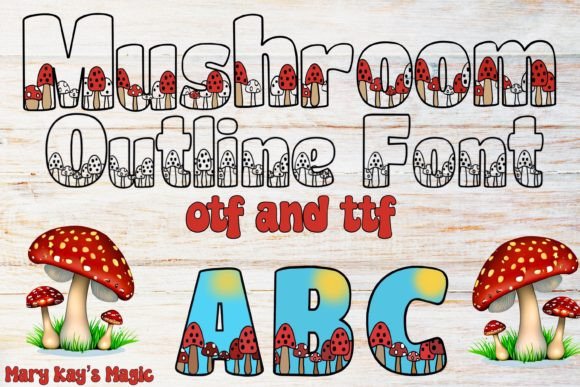
As a web designer, I am always searching for typefaces that inject genuine personality into a layout without compromising digital usability. Mushroom Outline fits this niche beautifully. This is a playful display font where tiny mushrooms nestle directly into the character shapes, giving each letter a curvy, storybook feel. It is the kind of typeface that instantly transforms a standard header into a memorable visual moment. Whether you are building a landing page for a creative entrepreneur or designing a brand identity for a boutique online store, Mushroom Outline adds that organic, handcrafted pop that plain sans serifs often lack.
The Visual Personality of Mushroom Outline in Digital Branding
Every web project needs a distinct tone. Mushroom Outline delivers a specific kind of whimsy that feels both contemporary and nostalgic. The curvy letterforms with embedded mushroom motifs create a natural, earthy aesthetic. This is not a font for dense body paragraphs; it is a display font built for moments that require attention. In my experience, using a creative font like this in a hero section immediately sets an approachable, imaginative mood. It signals to users that the brand values creativity and attention to detail, which builds trust in lifestyle, wellness, and children’s product niches. The tiny mushrooms reward a closer look, subtly encouraging visitors to engage with the text rather than just scan past it.
Using Mushroom Outline for Hero Sections and Landing Page Headers
Visual hierarchy starts with your headline. On a landing page, the display font you choose dictates the user’s emotional entry point. Mushroom Outline excels here because the intricate details inside the letters reward closer inspection. I have found it works best for short, punchy headers or call-to-action phrases. Because the letters are curvy and decorative, you want to give them generous breathing room. Pair the font with plenty of whitespace so its personality drives the design without overwhelming the layout.
Balancing Whimsy with Readability Above the Fold
One common concern with highly decorative fonts is scanning behavior. Users need to grasp the headline instantly. Mushroom Outline maintains solid readability for a display font because the character outlines are distinct. The tiny mushrooms are nestled within the negative space, not obscuring the strokes. For hero sections, I recommend using a larger size, around 48 pixels or higher on desktop, and ensuring the background is clean. A light pastel or neutral solid background works beautifully. On image overlays, a subtle gradient or drop shadow helps the display font remain crisp and keeps those mushroom details visible.
Mushroom Outline for Boutique Online Stores and Brand Assets
If you are designing for an online store that sells handmade goods, eco-friendly products, or children’s toys, Mushroom Outline is a fantastic choice for banner titles and section headers. It aligns perfectly with a brand identity that wants to feel approachable and crafted. For example, using it on a product landing page for organic skincare or artisan candles immediately communicates the brand’s natural roots. The font works seamlessly in digital brand kits, providing a consistent voice across website headers, email headers, and promotional banners.
Creating Consistent Online Identity with a Unique Display Font
Consistency is key in digital product creation. Once you integrate Mushroom Outline into your design system, it becomes a recognizable part of the brand. Use it sparingly for logo text, primary headings, or hero phrases to maximize its impact. Because it is a specialized display font, it carries more weight than a standard typeface. I often use it alongside a clean sans serif for body copy. This contrast creates a clear visual hierarchy: the playful, curvy mushroom font draws the eye, while the straightforward sans serif delivers the information efficiently.
Mushroom Outline for Call-to-Action Areas
Conversion-focused layouts benefit from typography that feels inviting. In call-to-action areas, Mushroom Outline can make a button or short phrase feel like a friendly invitation. Its playful nature encourages clicks in low-stakes, creative environments. For high-commitment actions like checkout, stick to a clean sans serif, but for email sign-ups or "explore more" buttons, this font adds significant character. Pairing it with a simple button shape keeps the focus on the whimsical lettering while maintaining usability.
Font Pairing Strategies for Mushroom Outline in Web Layouts
Pairing a decorative display font with the right body font is crucial for professional web design. Mushroom Outline has a handcrafted, organic feel, so it pairs well with simple, geometric sans serif fonts or modern serif fonts that do not compete for attention.
Pairing with Clean Sans Serif Fonts for Modern Typography
For a fresh, contemporary look, pair Mushroom Outline with a clean sans serif like Inter, Poppins, or Nunito Sans. The sans serif provides a stable, readable foundation for paragraphs, buttons, and navigation, while Mushroom Outline adds the creative spark. This is a highly effective combination for landing pages, portfolio sites, and SaaS products targeting creative industries. The contrast between the structured sans serif and the curvy display font creates a dynamic, engaging rhythm that guides the user naturally through the content.
Combining with Serif Fonts for Editorial and Lifestyle Brands
If you are aiming for a more editorial or premium feel, try pairing Mushroom Outline with a refined serif font such as Playfair Display or Cormorant Garamond. The serif adds a touch of sophistication and storytelling, which complements the whimsical nature of the mushroom motifs. This pairing works exceptionally well for lifestyle blogs, online magazines, and coaching websites. The serif handles the body text with elegance, while Mushroom Outline takes the spotlight in section headers and pull quotes.
Responsive Design Tips for Using Mushroom Outline on Mobile
Mobile screens require extra consideration for decorative fonts. Mushroom Outline has intricate details that need to render clearly at various sizes. On smaller viewports, avoid using it for body text or small buttons. The tiny mushrooms inside the characters can become muddled below 24 pixels. Instead, reserve it for large, impactful hero titles on mobile. Test the font on a dark background and a light background to ensure the outlines remain visible. I always recommend downloading the webfont files and testing them in a responsive prototype before finalizing the design.
Optimizing for Light Backgrounds and Dark Backgrounds
Mushroom Outline performs beautifully on light, airy backgrounds, including soft whites, creams, pastels, and light wood textures. The outline style stands out clearly against these surfaces. On dark backgrounds, the font can look magical, especially if you apply a light or vibrant color. However, ensure sufficient contrast so the tiny mushrooms do not disappear into the darkness. Using the font in a solid color over a dark image overlay is a safe bet for maintaining impact. If you are building a dark-mode layout, consider adding a subtle glow or outline effect to preserve the decorative details.
Commercial Licensing for Web Design and Client Projects
Before integrating Mushroom Outline into any client website, landing page, or digital template, check the commercial font license. Most premium fonts offer standard licenses that cover web use, app designs, and digital branding assets. If you are a freelancer building multiple client projects, look for a license that allows you to use the font across several domains. Proper licensing ensures your work is compliant and supports the type designers who create these unique design assets.
Creative Applications Beyond Standard Websites
While Mushroom Outline is a fantastic digital font, its applications extend to social media graphics, digital ads, course pages, and even packaging design mockups. For a marketing campaign, using this font in a video thumbnail or Instagram banner instantly differentiates the brand from competitors using generic typefaces. It is a versatile asset in any digital creator’s toolkit, especially for those working in the creative, lifestyle, or education spaces. Whether you are building a portfolio site or a branded email template, this display font brings a level of craft that resonates with modern audiences.
For web designers and digital product creators, finding a display font that balances character with usability is a win. Mushroom Outline delivers that delicate balance, offering curvy, playful letterforms with a hidden botanical detail that invites engagement. It earns its place in hero sections, brand headers, and landing page designs where the goal is to stop the scroll and spark curiosity. If you are building a brand that needs a touch of organic whimsy, this font is a strong addition to your typography stack.